TOOLKIT

100+ Revit operations, organized by outcome.

Pre-issue review comes first. AI, setup, comparison, selection, data, documentation, and delivery tools support the same controlled workflow.

Request accessExplore the toolkit
FEATURED

Pre-Issue Audit

Create a consistent review before model or drawing information is issued. Configure the supported scope, run checks, inspect findings, resolve or acknowledge what needs attention, then rerun.

Structured findingsProfessional review
Check categoryFinding / statusReview
Affected contextModel / sheetInspect
ResolutionUser decisionRerun

Esattia flags; the engineer decides.

CORE TOOL GROUPS

Find tools by the job you need to do.

The public directory groups supported capabilities without publishing an unverified operation count.

01

Pre-Issue QC & Verification

Pre-Issue Audit, Individual Checks, warnings, consistency, and supported review operations.

02

Model Setup

Esattia Setup and supported project preparation workflows.

03

Drawings & Revisions

Drawing Comparison, sheet preparation, and revision-review workflows.

04

Selection & Navigation

Select By Level and supported model-navigation operations.

05

Data & Parameters

Inspect and, where supported, prepare controlled updates to project information.

06

Export & Delivery

Export Sheets to PDF, IFC Export, and related delivery preparation.

07

AI-Assisted Operations

Natural-language access to supported checks and guided workflows.

08 · SUPPORTING

Workflow Utilities

Brief Generator, Meeting Recorder, and Project Tasks where available.

Revit Setup icon
REVIT SETUP

Start Revit with the project context already organized.

Revit Setup helps turn drawings and project inputs into a structured starting point, reducing repetitive setup work before the core review and modeling workflow begins.

INPUT

Project information

Provide the supported drawing, level, scope, or configuration information required by the current Setup workflow.

PROCESS

Validate and prepare

Esattia checks supported setup conditions, prepares the available structure, and flags missing information that needs review.

RESULT

A clearer starting point

The team receives a reviewable setup basis for later checks and project work.
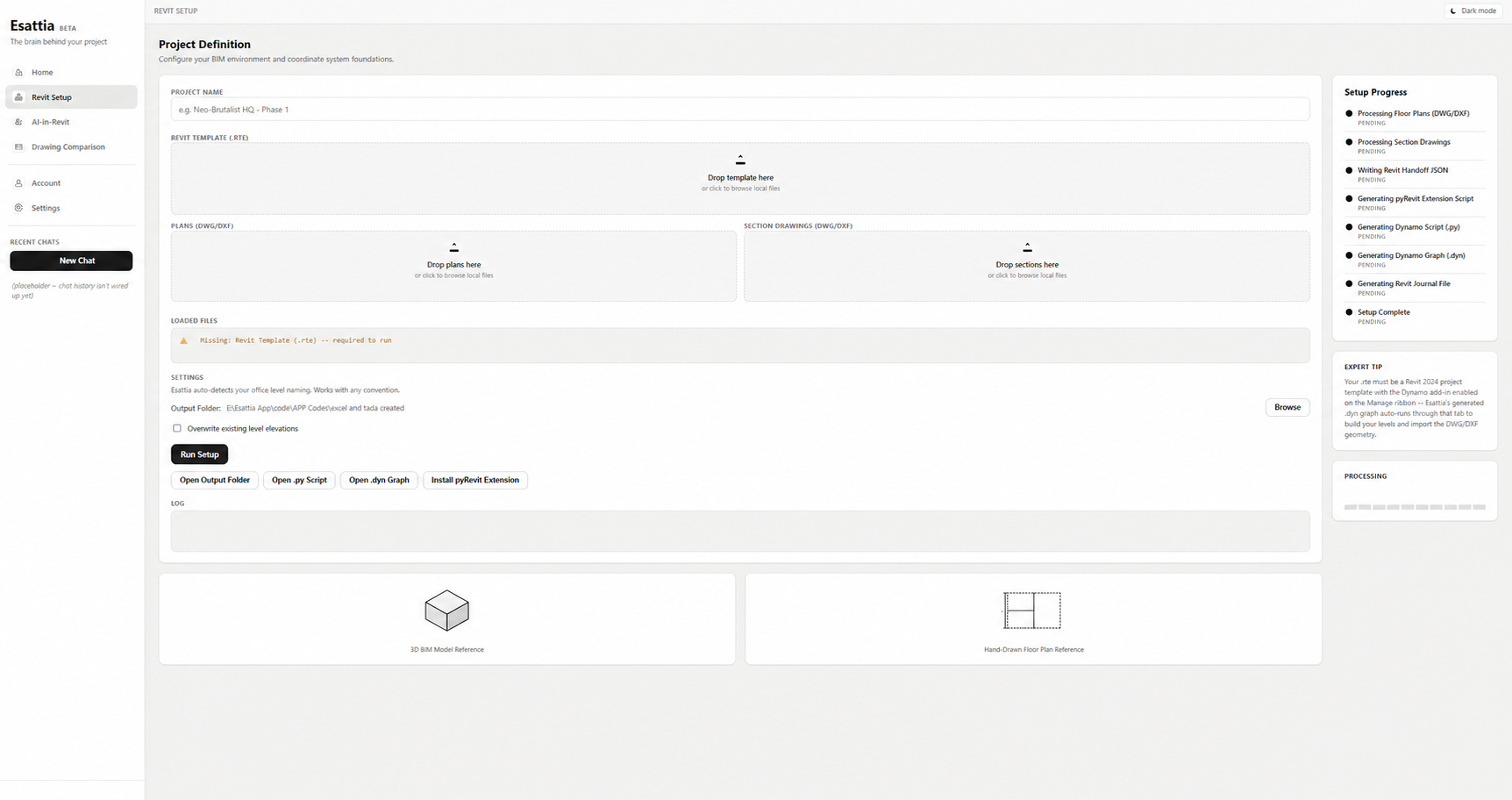
Esattia Revit Setup interface for preparing a structured project starting point
Drawing Comparison icon
DRAWING COMPARISON

See what changed—without checking drawings line by line.

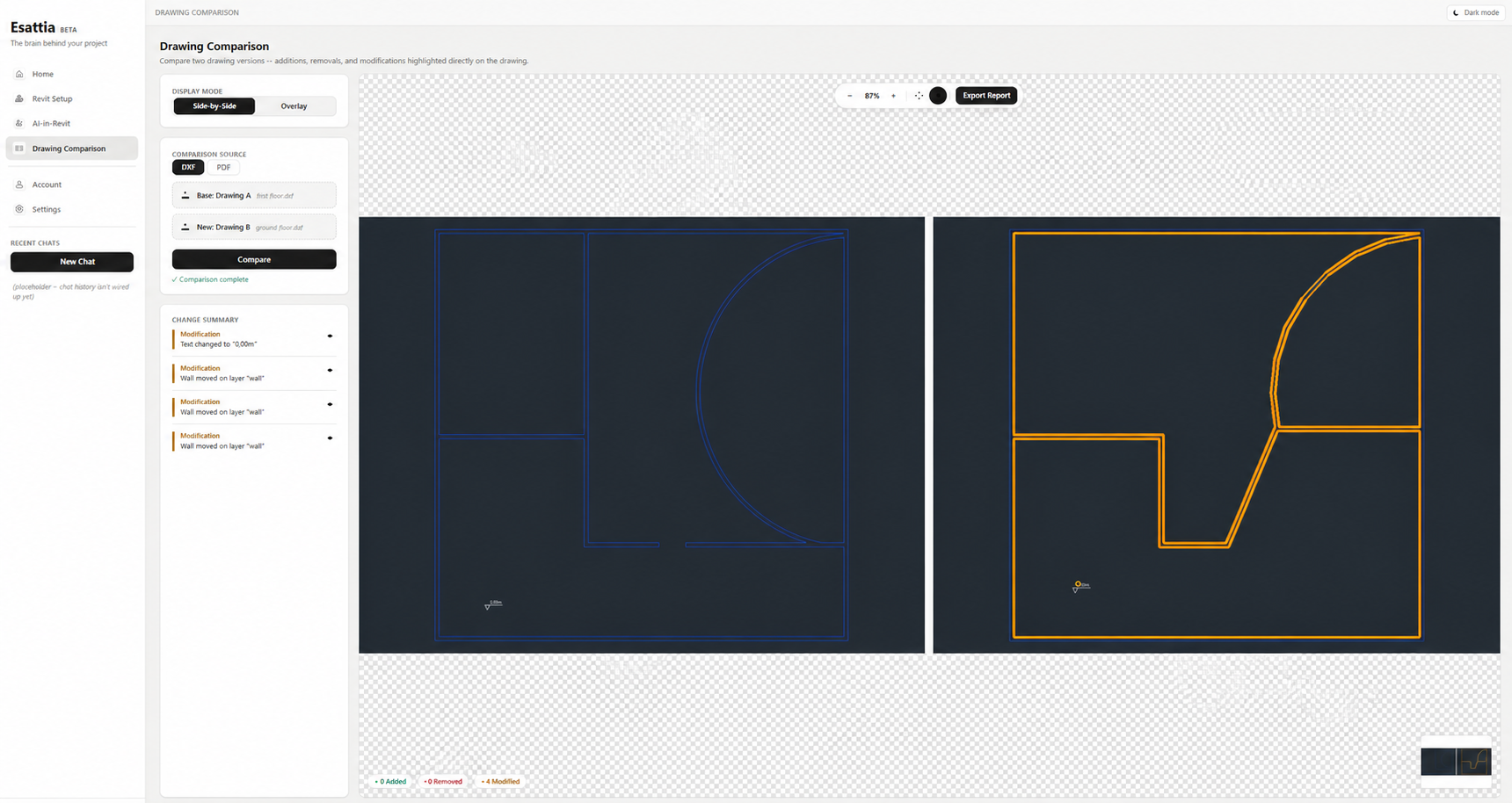
Esattia compares drawing revisions, identifies additions, removals, and modifications, and turns the differences into a reviewable change summary. The engineer determines the technical significance of every change.

Esattia comparing two populated drawing revisions with detected modifications and a visible change summary
SUPPORTING WORKFLOW TOOLS

Useful around the core Revit workflow.

Brief Generator

Turns user-supplied requirements and notes into an editable starting draft for review, completion, and correction.

Meeting Recorder

Supporting meeting workflow where available. It does not define Esattia's core product positioning.

Project Tasks

Lightweight task organization beside the project workflow, presented as a secondary utility.

EARLY ACCESS

Start with the review workflow.

Request access to the current Esattia preview.