Review revisions
Focus revision reviews on what was added, removed or modified. Comparison coverage depends on the supported model and workflow.
Start with IFC model review. Then move into PDF drawing changes and DXF geometry, with findings designed to stay connected to Eli, issues and project context.
Bring the detail into focus. Explore model context, inspect measurements and frame the questions that move coordination forward. Keep the model, the finding and the next conversation connected.

A revision review asks what changed in the same model. Discipline coordination asks how different models fit together. Those questions need different checks and a clear shared reference frame.
Focus revision reviews on what was added, removed or modified. Comparison coverage depends on the supported model and workflow.
Keep architecture, structure and MEP in the coordination conversation. Review model placement and alignment before drawing conclusions.
Keep dimensions alongside the geometry you are inspecting. Use measurements to inform review and verify critical dimensions against the source model.
Revision comparison follows one model over time. Coordination examines models from different disciplines. In a Three Files development workflow, a base and revised model are reviewed alongside a separate coordination reference. Confirm file roles, alignment and supported checks before interpreting results; this workflow has not been confirmed for a public release.
A change is not automatically a defect. Review findings against the source model and the intended engineering decision.
Pipes, ducts and equipment need space alongside architectural and structural geometry. Esattia’s target workflow brings potential interferences into a reviewable issue, with relevant model context.
Review routing, clearances and discipline boundaries before deciding whether a finding matters.
Development previews include candidate IFC coordination findings and issue drafts. Broader automatic MEP workflows are planned; every finding needs professional review.
The intended Eli connection helps interpret supported evidence; it does not replace engineering judgment.
A combined IFC carries selected models together. BCF carries coordination issues and viewpoints. One does not substitute for the other.
Development preview · Selected-model IFC export is under validation. Public release coverage is unconfirmed; any output needs placement, geometry and receiving-application checks.
Development preview · Issue and viewpoint export is under validation. The supported BCF version and receiving-application compatibility need release-specific confirmation. BCF is not a merged IFC model.
Overlay-based drawing review is intended to make additions, removals and changed areas easier to inspect. Compare the relevant revisions, then examine the surrounding technical context.
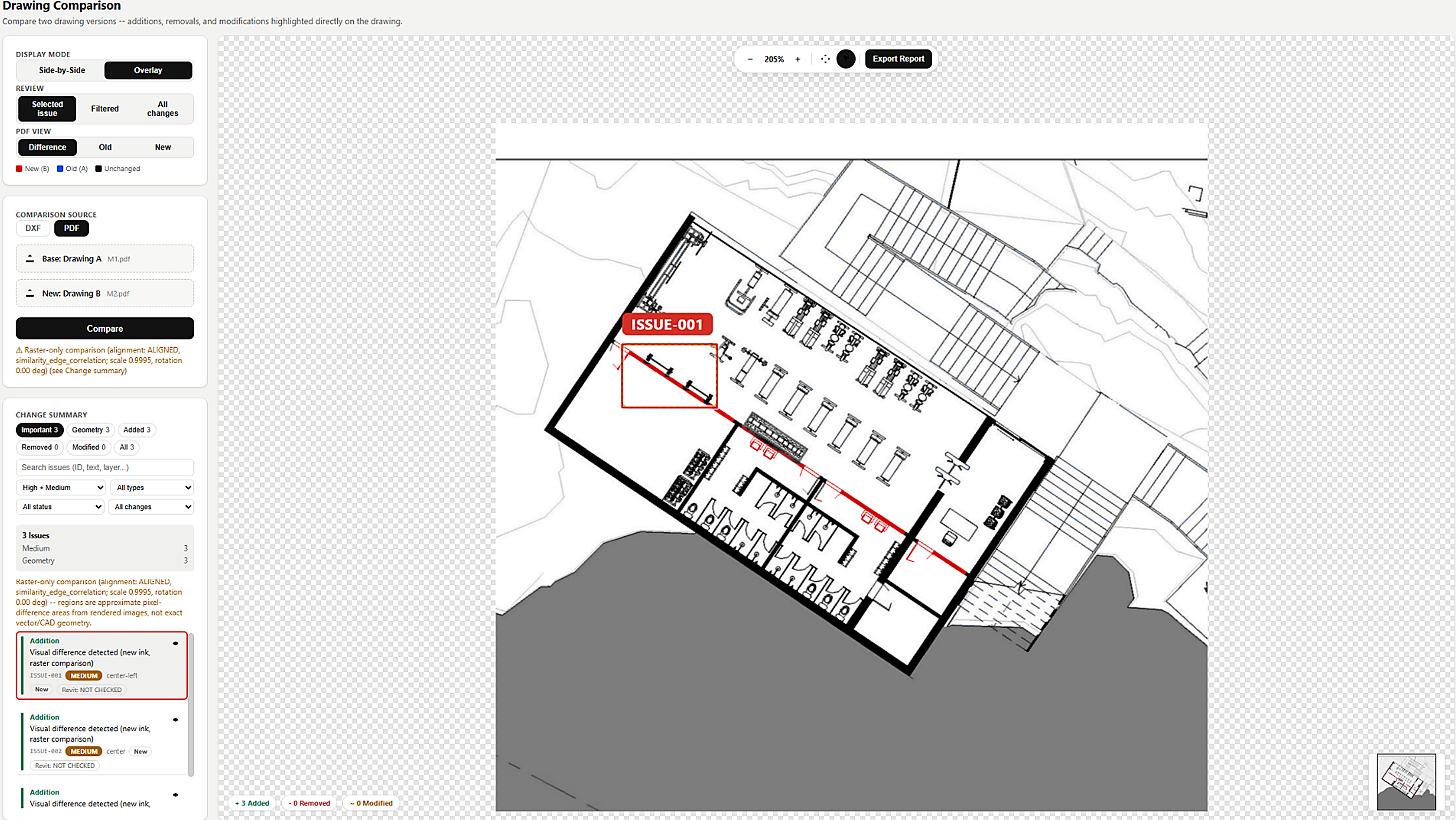
The target DXF workflow compares supported drawing objects and geometry to inspect additions, removals and revisions. PDF review is visual; DXF can use structured geometry. Coverage varies by entity type.
Development preview · DXF review supports selected geometry workflows. Confirm entity coverage, alignment and tolerances for your drawings.
The connected target workflow keeps the reviewed finding, relevant revision and team decision together.
Development previews connect local project files, comparison findings and conversation references. Cross-office delivery and the complete issue lifecycle are planned.
A technically useful review starts with the right question, the right revisions and a clear model reference frame. These distinctions help BIM coordinators and multidisciplinary teams choose a supported workflow.
An IFC viewer helps you inspect model geometry and available properties. IFC comparison asks what changed between versions, such as added, removed or modified elements. A change should be reviewed in its source context before it becomes a coordination issue.
Revision comparison follows the same model across time. Coordination reviews how architecture, structure and MEP models relate to one another. Confirm units, placements, reference frames and model scope before interpreting an apparent difference or interference.
Review the context around pipes, ducts, equipment, structural members and architectural geometry. A visual intersection is evidence to inspect, not automatic approval or a confirmed clash. Selected IFC coordination checks and issue drafts are development previews. Broader automatic MEP workflows are planned.
That is the intended connected workflow: inspect a finding, review it with Eli, reference the relevant revision in an issue, discuss it with a colleague and track the next revision in Projects. Local finding and project references are development previews. Cross-office issue sharing and the complete lifecycle are planned.
No. BCF exchanges coordination issues, viewpoints and related context. A combined IFC export aims to contain selected source models in one IFC file. Both exports are development previews. Check model placement and geometry before using an exported model, and confirm BCF compatibility with the receiving application.
Use representative models and known changes to check geometry coverage, placement, unit handling, revision matching and issue traceability. Verify critical dimensions and findings against the source information. A visible interface alone does not establish current release coverage.